
Hierarchical Storage Management (HSM)
This chapter describes how to bind Lustre to a Hierarchical Storage Management (HSM) solution.
Introduction
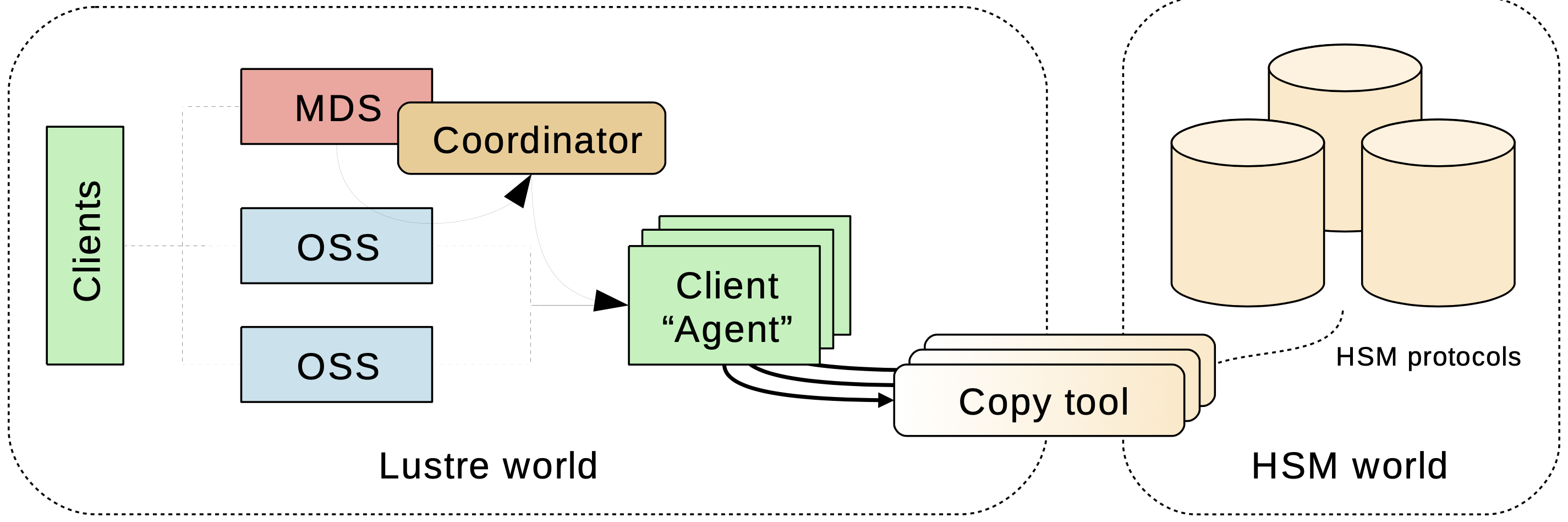
The Lustre file system can bind to a Hierarchical Storage Management (HSM) solution using a specific set of functions. These functions enable connecting a Lustre file system to one or more external storage systems, typically HSMs. With a Lustre file system bound to a HSM solution, the Lustre file system acts as a high speed cache in front of these slower HSM storage systems.
The Lustre file system integration with HSM provides a mechanism for files to simultaneously exist in a HSM solution and have a metadata entry in the Lustre file system that can be examined. Reading, writing or truncating the file will trigger the file data to be fetched from the HSM storage back into the Lustre file system.
The process of copying a file into the HSM storage is known as archive. Once the archive is complete, the Lustre file data can be deleted (known as release.) The process of returning data from the HSM storage to the Lustre file system is called restore. The archive and restore operations require a Lustre file system component called an Agent.
An Agent is a specially designed Lustre client node that mounts the Lustre file system in question. On an Agent, a user space program called a copytool is run to coordinate the archive and restore of files between the Lustre file system and the HSM solution.
Requests to restore a given file are registered and dispatched by a facet on the MDT called the Coordinator.
Setup
Requirements
To setup a Lustre/HSM configuration you need:
- a standard Lustre file system (version 2.5.0 and above)
- a minimum of 2 clients, 1 used for your chosen computation task that generates useful data, and 1 used as an agent.
Multiple agents can be employed. All the agents need to share access to their backend storage. For the POSIX copytool, a POSIX namespace like NFS or another Lustre file system is suitable.
Coordinator
To bind a Lustre file system to a HSM system a coordinator must be activated on each of your filesystem MDTs. This can be achieved with the command:
$ lctl set_param mdt.$FSNAME-MDT0000.hsm_control=enabled
mdt.lustre-MDT0000.hsm_control=enabled
To verify that the coordinator is running correctly
$ lctl get_param mdt.$FSNAME-MDT0000.hsm_control
mdt.lustre-MDT0000.hsm_control=enabled
Agents
Once a coordinator is started, launch the copytool on each agent node to connect to your HSM storage. If your HSM storage has POSIX access this command will be of the form:
lhsmtool_posix --daemon --hsm-root $HSMPATH --archive=1 $LUSTREPATHThe POSIX copytool must be stopped by sending it a TERM signal.
Agents and copytool
Agents are Lustre file system clients running copytool. copytool is a userspace daemon that transfers data between Lustre and a HSM solution. Because different HSM solutions use different APIs, copytools can typically only work with a specific HSM. Only one copytool can be run by an agent node.
The following rule applies regarding copytool instances: a Lustre file system only supports a single copytool process, per ARCHIVE ID (see below), per client node. Due to a Lustre software limitation, this constraint is irrespective of the number of Lustre file systems mounted by the Agent.
Bundled with Lustre tools, the POSIX copytool can work with any HSM or external storage that exports a POSIX API.
Archive ID, multiple backends
A Lustre file system can be bound to several different HSM solutions. Each bound HSM solution is identified by a number referred to as ARCHIVE ID. A unique value of ARCHIVE ID must be chosen for each bound HSM solution. ARCHIVE ID must be in the range 1 to 32.
A Lustre file system supports an unlimited number of copytool instances. You need, at least, one copytool per ARCHIVE ID. When using the POSIX copytool, this ID is defined using --archive switch.
For example: if a single Lustre file system is bound to two different HSMs (A and B,) ARCHIVE ID “1” can be chosen for HSM A and ARCHIVE ID “2” for HSM B. If you start 3 copytool instances for ARCHIVE ID 1, all of them will use Archive ID “1”. The same rule applies for copytool instances dealing with the HSM B, using Archive ID “2”.
When issuing HSM requests, you can use the --archive switch to choose the backend you want to use. In this example, file foo will be archived into backend ARCHIVE ID “5”:
$ lfs hsm_archive --archive=5 /mnt/lustre/fooA default ARCHIVE ID can be defined which will be used when the --archive switch is not specified:
$ lctl set_param -P mdt.lustre-MDT0000.hsm.default_archive_id=5The ARCHIVE ID of archived files can be checked using lfs hsm_state command:
$ lfs hsm_state /mnt/lustre/foo
/mnt/lustre/foo: (0x00000009) exists archived, archive_id:5
Registered agents
A Lustre file system allocates a unique UUID per client mount point, for each filesystem. Only one copytool can be registered for each Lustre mount point. As a consequence, the UUID uniquely identifies a copytool, per filesystem.
The currently registered copytool instances (agents UUID) can be retrieved by running the following command, per MDT, on MDS nodes:
$ lctl get_param -n mdt.$FSNAME-MDT0000.hsm.agents
uuid=a19b2416-0930-fc1f-8c58-c985ba5127ad archive_id=1 requests=[current:0 ok:0 errors:0]
The returned fields have the following meaning:
uuidthe client mount used by the corresponding copytool.archive_idcomma-separated list of ARCHIVE IDs accessible by this copytool.requestsvarious statistics on the number of requests processed by this copytool.
Timeout
One or more copytool instances may experience conditions that cause them to become unresponsive. To avoid blocking access to the related files a timeout value is defined for request processing. A copytool must be able to fully complete a request within this time. The default is 3600 seconds.
$ lctl set_param -n mdt.lustre-MDT0000.hsm.active_request_timeoutRequests
Data management between a Lustre file system and HSM solutions is driven by requests. There are five types:
ARCHIVECopy data from a Lustre file system file into the HSM solution.RELEASERemove file data from the Lustre file system.RESTORECopy back data from the HSM solution into the corresponding Lustre file system file.REMOVEDelete the copy of the data from the HSM solution.CANCELCancel an in-progress or pending request.
Only the RELEASE is performed synchronously and does not involve the coordinator. Other requests are handled by Coordinators. Each MDT coordinator is resiliently managing them.
Commands
Requests are submitted using lfs command:
$ lfs hsm_archive [--archive=ID] FILE1 [FILE2...]
$ lfs hsm_release FILE1 [FILE2...]
$ lfs hsm_restore FILE1 [FILE2...]
$ lfs hsm_remove  FILE1 [FILE2...]
Requests are sent to the default ARCHIVE ID unless an ARCHIVE ID is specified with the --archive option (See Archive ID, multiple backends).
Automatic restore
Released files are automatically restored when a process tries to read or modify them. The corresponding I/O will block waiting for the file to be restored. This is transparent to the process. For example, the following command automatically restores the file if released.
$ cat /mnt/lustre/released_fileRequest monitoring
The list of registered requests and their status can be monitored, per MDT, with the following command:
$ lctl get_param -n mdt.lustre-MDT0000.hsm.actionsThe list of requests currently being processed by a copytool is available with:
$ lctl get_param -n mdt.lustre-MDT0000.hsm.active_requestsFile states
When files are archived or released, their state in the Lustre file system changes. This state can be read using the following lfs command:
$ lfs hsm_state FILE1 [FILE2...]There is also a list of specific policy flags which could be set to have a per-file specific policy:
NOARCHIVEThis file will never be archived.NORELEASEThis file will never be released. This value cannot be set if the flag is currently set toRELEASEDDIRTYThis file has been modified since a copy of it was made in the HSM solution.DIRTYfiles should be archived again. TheDIRTYflag can only be set ifEXISTis set.
The following options can only be set by the root user.
LOSTThis file was previously archived but the copy was lost on the HSM solution for some reason in the backend (for example, by a corrupted tape), and could not be restored. If the file is not in theRELEASEstate it needs to be archived again. If the file is in theRELEASEstate, the file data is lost.
Some flags can be manually set or cleared using the following commands:
$ lfs hsm_set [FLAGS] FILE1 [FILE2...]
$ lfs hsm_clear [FLAGS] FILE1 [FILE2...]
Tuning
hsm_controlpolicy
hsm_control controls coordinator activity and can also purge the action list.
$ lctl set_param mdt.$FSNAME-MDT0000.hsm_control=purgePossible values are:
enabledStart coordinator thread. Requests are dispatched on available copytool instances.disabledPause coordinator activity. No new request will be scheduled. No timeout will be handled. New requests will be registered but will be handled only when the coordinator is enabled again.shutdownStop coordinator thread. No request can be submitted.purgeClear all recorded requests. Do not change coordinator state.
max_requests
max_requests is the maximum number of active requests at the same time. This is a per coordinator value, and independent of the number of agents.
For example, if 2 MDT and 4 agents are present, the agents will never have to handle more than 2 x max_requests.
$ lctl set_param mdt.$FSNAME-MDT0000.hsm.max_requests=10policy
Change system behavior. Values can be added or removed by prefixing them with ‘+’ or ‘-’.
$ lctl set_param mdt.$FSNAME-MDT0000.hsm.policy=+NRAPossible values are a combination of:
NRANo Retry Action. If a restore fails, do not reschedule it automatically.NBRNon Blocking Restore. Restore is triggered but does not block clients. Access to a released file returnsENODATA.
grace_delay
grace_delay is the delay, expressed in seconds, before a successful or failed request is cleared from the whole request list.
$ lctl set_param mdt.$FSNAME-MDT0000.hsm.grace_delay=10change logs
A changelog record type HSM was added for Lustre file system logs that relate to HSM events.
16HSM 13:49:47.469433938 2013.10.01 0x280 t=[0x200000400:0x1:0x0]Two items of information are available for each HSM record: the FID of the modified file and a bit mask. The bit mask codes the following information (low bits first):
- Error code, if any (7 bits)
- HSM event (3 bits)
HE_ARCHIVE = 0File has been archived.HE_RESTORE = 1File has been restored.HE_CANCEL = 2A request for this file has been canceled.HE_RELEASE = 3File has been released.HE_REMOVE = 4A remove request has been executed automatically.HE_STATE = 5File flags have changed.
- HSM flags (3 bits)
CLF_HSM_DIRTY=0x1
In the above example, 0x280 means the error code is 0 and the event is HE_STATE.
When using liblustreapi, there is a list of helper functions to easily extract the different values from this bitmask, like: hsm_get_cl_event(), hsm_get_cl_flags(), and hsm_get_cl_error()
Policy engine
A Lustre file system does not have an internal component responsible for automatically scheduling archive requests and release requests under any conditions (like low space). Automatically scheduling archive operations is the role of the policy engine.
It is recommended that the Policy Engine run on a dedicated client, similar to an agent node, with a Lustre version 2.5+.
A policy engine is a userspace program using the Lustre file system HSM specific API to monitor the file system and schedule requests.
Robinhood is the recommended policy engine.
Robinhood
Robinhood is a Policy engine and reporting tool for large file systems. It maintains a replicate of file system metadata in a database that can be queried at will. Robinhood makes it possible to schedule mass action on file system entries by defining attribute-based policies, provides fast find and du enhanced clones, and provides administrators with an overall view of file system content through a web interface and command line tools.
Robinhood can be used for various configurations. Robinhood is an external project, and further information can be found on the project website: https://sourceforge.net/apps/trac/robinhood/wiki/Doc.