
System Configuration Utilities
This chapter includes system configuration utilities and includes the following sections:
- l_getidentity
- lctl
- ll_decode_filter_fid
- llog_reader
- llstat
- llverdev
- lshowmount
- lst
- lustre_rmmod.sh
- lustre_rsync
- mkfs.lustre
- mount.lustre
- routerstat
- tunefs.lustre
- Additional System Configuration Utilities
l_getidentity
The l_getidentity tool normally handles Lustre user/group mapping upcall.
Synopsis
l_getidentity { $FSNAME-MDT{xxxx}| -d} {uid}Description
The l_getidentity utility is called from the MDS to map a numeric UID value into the list of supplementary group values for that UID, and writes this into the mdt.*.identity_info parameter file. The list of supplementary groups is cached in the kernel to avoid repeated upcalls. See User/Group Upcall for more details.
The l_getidentity utility can also be run directly for debugging purposes to ensure that the UID mapping for a particular user is configured correctly, by using the -d argument instead of the MDT name.
Options
| Option | Description |
|---|---|
${FSNAME}-MDT{xxxx} | Metadata server target name |
uid | User identifier |
Files
The parameter to set the l_getidentity path is:
mds# lctl set_param -P mdt.*-MDT*.identity_upcall=pathlctl
The lctl utility is used for root control and configuration. With lctl you can directly control Lustre via an ioctl interface, allowing various configuration, maintenance and debugging features to be accessed.
Synopsis
lctl [--device devno] command [args]Description
The lctl utility can be invoked in interactive mode by issuing the lctl command. After that, commands are issued as shown below. The most common lctl commands are:
dl
dk
device
network up|down
list_nids
ping nidhelp
quit
For a complete list of available commands, type help at the lctl prompt. To get basic help on command meaning and syntax, type help *command*. Command completion is activated with the TAB key (depending on compile options), and command history is available via the up- and down-arrow keys.
For non-interactive use, use the second invocation, which runs the command after connecting to the device.
Setting Parameters with lctl
Lustre parameters are not always accessible using the procfs interface, as it is platform-specific. As a solution, lctl {get,set}_param provides a platform-independent interface to the Lustre tunables. Avoid any direct references to /proc and /sys files in scripts. For future portability, instead use lctl {get,set}_param, which handles these details internally.
When the file system is running, use the lctl set_param command on the affected node(s) to temporarily set parameters (mapping to items in). The lctl set_param command uses this syntax:
lctl set_param [-n] [-P] [-d] obdtype.obdname.property=valueFor example:
mds# lctl set_param mdt.testfs-MDT0000.identity_upcall=NONEUse -P option to set parameters permanently. Option -d deletes permanent parameters. For example:
mgs# lctl set_param -P mdt.testfs-MDT0000.identity_upcall=NONE
mgs# lctl set_param -P -d mdt.testfs-MDT0000.identity_upcall
Many permanent parameters can be set with the lctl conf_param utility. In general, lctl conf_param can be used to specify any OBD device parameter settable in a /proc/fs/lustre file. The lctl conf_param command must be run on the MGS node, and uses this syntax:
obd|fsname.obdtype.property=value)For example:
mgs# lctl conf_param testfs-MDT0000.mdt.identity_upcall=NONE
$ lctl conf_param testfs.llite.max_read_ahead_mb=16
Caution
The lctl conf_param command permanently sets parameters in the file system configuration for all nodes of the specified type.
To get current Lustre parameter settings, use the lctl get_param command on the desired node with the same parameter name as lctl set_param:
# lctl get_param [-n] obdtype.obdname.parameterFor example:
mds# lctl get_param mdt.testfs-MDT0000.identity_upcallTo list Lustre parameters that are available to set, use the lctl list_param command, with this syntax:
# lctl list_param [-R] [-F] obdtype.obdname.*For example, to list all of the parameters on the MDT:
oss# lctl list_param -RF mdtFor more information on using lctl to set temporary and permanent parameters, see Setting Parameters with lctl.
Network Configuration
| Option | Description |
|---|---|
network up|down|tcp|elan | Starts or stops LNet, or selects a network type for other lctl LNet commands. |
list_nids | Prints all NIDs on the local node. LNet must be running. |
which_nid *nidlist* | From a list of NIDs for a remote node, identifies the NID on which interface communication will occur. |
ping *nid* | Checks LNet connectivity via an LNet ping. This uses the fabric appropriate to the specified NID. |
interface_list | Prints the network interface information for a given network type. |
peer_list | Prints the known peers for a given network type. |
conn_list | Prints all the connected remote NIDs for a given network type. |
active_tx | This command prints active transmits. It is only used for the Elan network type. |
route_list | Prints the complete routing table. |
Device Selection
| Option | Description | |
|---|---|---|
device *devname* | This selects the specified OBD device. All other commands depend on the device being set. | |
device_list | Shows the local Lustre OBDs, a/k/a dl. |
Device Operations
| Option | Description | |
|---|---|---|
list_param [-F|-R] *parameter* *[parameter ...]* | Lists the Lustre or LNet parameter name. | |
-F | Adds ‘/’, ‘@’ or ‘=’ for directories, symlinks and writeable files, respectively. | |
-R | Recursively lists all parameters under the specified path. If param_path is unspecified, all parameters are shown. | |
get_param [-n|-N|-F] *parameter* *[parameter ...]* | Gets the value of a Lustre or LNet parameter from the specified path. | |
-n | Prints only the parameter value and not the parameter name. | |
-N | Prints only matched parameter names and not the values; especially useful when using patterns. | |
-F | When -N is specified, adds ‘/’, ‘@’ or ‘=’ for directories, symlinks and writeable files, respectively. | |
set_param [-n] *parameter*=*value* | Sets the value of a Lustre or LNet parameter from the specified path. | |
-n | Disables printing of the key name when printing values. | |
conf_param [-d] *device|fsname* *parameter*=*value* | Sets a permanent configuration parameter for any device via the MGS. This command must be run on the MGS node. All writeable parameters under lctl list_param (e.g. lctl list_param -F osc.*.* | grep =) can be permanently set using lctl conf_param, but the conversion of list_param names to conf_param names is not obvious, so it is preferred to use the set_param -P command. For more information on setting permanent parameters, see Setting Permanent Parameters (Setting Permanent Parameters). | |
-d *device|fsname*.*parameter* | Deletes a parameter setting (use the default value at the next restart). A null value for value also deletes the parameter setting. | |
activate | Re-activates an import after the deactivate operation. This setting is only effective until the next restart (see conf_param). | |
deactivate | Deactivates an import, in particular meaning do not assign new file stripes to an OSC. Running lctl deactivate on the MDS stops new objects from being allocated on the OST. Running lctl deactivate on Lustre clients causes them to return -EIO when accessing objects on the OST instead of waiting for recovery. | |
abort_recovery | Aborts the recovery process on a re-starting MDT or OST. |
Note
Lustre tunables are not always accessible using the procfs interface, as it is platform-specific. As a solution, lctl {get,set,list}_param has been introduced as a platform-independent interface to the Lustre tunables. Avoid direct references to /proc/{fs,sys}/{lustre,lnet}. For future portability, use lctl {get,set,list}_param instead.
Virtual Block Device Operations
Lustre can emulate a virtual block device upon a regular file. This emulation is needed when you are trying to set up a swap space via the file.
| Option | Description |
|---|---|
blockdev_attach *filename* */dev/lloop_device* | Attaches a regular Lustre file to a block device. If the device node does not exist, lctl creates it. It is recommend that a device node is created by lctl since the emulator uses a dynamical major number. |
blockdev_detach */dev/lloop_device* | Detaches the virtual block device. |
blockdev_info */dev/lloop_device* | Provides information about the Lustre file attached to the device node. |
Changelogs
| Option | Description |
|---|---|
changelog_register | Registers a new changelog user for a particular device. Changelog entries are saved persistently on the MDT with each filesystem operation, and are only purged beyond all registered user’s minimum set point (see lfs changelog_clear). This may cause the Changelog to consume a large amount of space, eventually filling the MDT, if a changelog user is registered but never consumes those records. |
| changelog_deregister id | Unregisters an existing changelog user. If the user’s “clear” record number is the minimum for the device, changelog records are purged until the next minimum. |
Debug
| Option | Description |
|---|---|
debug_daemon | Starts and stops the debug daemon, and controls the output filename and size. |
debug_kernel *[file]* [raw] | Dumps the kernel debug buffer to stdout or a file. |
debug_file *input_file* *[output_file]* | Converts the kernel-dumped debug log from binary to plain text format. |
clear | Clears the kernel debug buffer. |
mark *text* | Inserts marker text in the kernel debug buffer. |
filter *subsystem_id|debug_mask* | Filters kernel debug messages by subsystem or mask. |
show *subsystem_id|debug_mask* | Shows specific types of messages. |
debug_list *subsystems|types* | Lists all subsystem and debug types. |
modules *path* | Provides GDB-friendly module information. |
Options
Use the following options to invoke lctl.
| Option | Description |
|---|---|
--device | Device to be used for the operation (specified by name or number). See device_list. |
--ignore_errors | ignore_errors | Ignores errors during script processing. |
Examples
lctl
$ lctl
lctl > dl
   0 UP mgc MGC192.168.0.20@tcp btbb24e3-7deb-2ffa-eab0-44dffe00f692 5
   1 UP ost OSS OSS_uuid 3
   2 UP obdfilter testfs-OST0000 testfs-OST0000_UUID 3
lctl > dk /tmp/log Debug log: 87 lines, 87 kept, 0 dropped.
lctl > quit
See Also
ll_decode_filter_fid
The ll_decode_filter_fid utility displays the Lustre object ID and MDT parent FID.
Synopsis
ll_decode_filter_fid object_file [object_file ...]Description
The ll_decode_filter_fid utility decodes and prints the Lustre OST object ID, MDT FID, stripe index for the specified OST object(s), which is stored in the “trusted.fid” attribute on each OST object. This is accessible to ll_decode_filter_fid when the OST file system is mounted locally as type ldiskfs for maintenance.
The “trusted.fid” extended attribute is stored on each OST object when it is first modified (data written or attributes set), and is not accessed or modified by Lustre after that time.
The OST object ID (objid) may be useful in case of OST directory corruption, though LFSCK can normally reconstruct the entire OST object directory tree, see Checking the file system with LFSCK for details. The MDS FID can be useful to determine which MDS inode an OST object is (or was) used by. The stripe index can be used in conjunction with other OST objects to reconstruct the layout of a file even if the MDT inode was lost.
Examples
root@oss1# cd /mnt/ost/lost+found
root@oss1# ll_decode_filter_fid #123454 #123455 #123458
#123454: objid=690670 seq=0 parent=[0x751c5:0xfce6e605:0x0]
#123455: objid=614725 seq=0 parent=[0x18d11:0xebba84eb:0x1]
#123458: objid=533088 seq=0 parent=[0x21417:0x19734d61:0x0]
This shows that the three files in lost+found have decimal object IDs - 690670, 614725, and 533088, respectively. The object sequence number (formerly object group) is 0 for all current OST objects.
The MDT parent inode FIDs are hexadecimal numbers of the form sequence:oid:idx. Since the sequence number is below 0x100000000 in all these cases, the FIDs are in the legacy Inode and Generation In FID (IGIF) namespace and are mapped directly to the MDT inode = seq and generation = oid values; the MDT inodes are 0x751c5, 0x18d11, and 0x21417 respectively. For objects with MDT parent sequence numbers above 0x200000000, this indicates that the FID needs to be mapped via the MDT Object Index (OI) file on the MDT to determine the internal inode number.
The idx field shows the stripe number of this OST object in the Lustre RAID-0 striped file.
llobdstat
The llobdstat utility displays the Lustre object ID and MDT parent FID.
Synopsis
llobdstat ost_name [interval]Description
The llobdstat utility displays a line of OST statistics for the given ost_name every interval seconds. It should be run directly on an OSS node. Type CTRL-C to stop statistics printing.
Example
# llobdstat liane-OST0002 1
/usr/bin/llobdstat on /proc/fs/lustre/obdfilter/liane-OST0002/stats
Processor counters run at 2800.189 MHz
Read: 1.21431e+07, Write: 9.93363e+08, create/destroy: 24/1499, stat: 34, p\
unch: 18
[NOTE: cx: create, dx: destroy, st: statfs, pu: punch ]
Timestamp Read-delta ReadRate Write-delta WriteRate
--------------------------------------------------------
1217026053 0.00MB 0.00MB/s 0.00MB 0.00MB/s
1217026054 0.00MB 0.00MB/s 0.00MB 0.00MB/s
1217026055 0.00MB 0.00MB/s 0.00MB 0.00MB/s
1217026056 0.00MB 0.00MB/s 0.00MB 0.00MB/s
1217026057 0.00MB 0.00MB/s 0.00MB 0.00MB/s
1217026058 0.00MB 0.00MB/s 0.00MB 0.00MB/s
1217026059 0.00MB 0.00MB/s 0.00MB 0.00MB/s st:1
Files
/proc/fs/lustre/obdfilter/ostname/statsllog_reader
The llog_reader utility translates a Lustre configuration log into human-readable form.
Synopsis
llog_reader filenameDescription
The llog_reader utility parses the binary format of Lustre’s on-disk configuration logs. Llog_reader can only read logs; use tunefs.lustre to write to them.
To examine a log file on a stopped Lustre server, mount its backing file system as ldiskfs or zfs, then use llog_reader to dump the log file’s contents, for example:
mount -t ldiskfs /dev/sda /mnt/mgs
llog_reader /mnt/mgs/CONFIGS/tfs-client
To examine the same log file on a running Lustre server, use the ldiskfs-enabled debugfs utility (called debug.ldiskfs on some distributions) to extract the file, for example:
debugfs -c -R 'dump CONFIGS/tfs-client /tmp/tfs-client' /dev/sda
llog_reader /tmp/tfs-client
Caution
Although they are stored in the CONFIGS directory, mountdata files do not use the configuration log format and will confuse the llog_reader utility.
See Also
llstat
Synopsis
llstat [-c] [-g] [-i interval] stats_fileDescription
The llstat utility displays statistics from any of the Lustre statistics parameter files on the local node that share a common format and are updated at interval seconds. To stop stats printing, use CTRL-C.
Options
| Option | Description |
|---|---|
-c | Clears the statistics file. |
-i | Specifies the polling period (in seconds). |
-g | Specifies graphable output format. |
-h | Displays help information. |
stats_file | Specifies either the full path to a statistics file or the shorthand reference, mds or ost |
Example
To monitor /proc/fs/lustre/ost/OSS/ost/stats at 1 second intervals, run;
llstat -i 1 ostFiles
The llstat files are located at:
/proc/fs/lustre/mdt/MDS/*/stats
/proc/fs/lustre/mdt/*/exports/*/stats
/proc/fs/lustre/mdc/*/stats
/proc/fs/lustre/ldlm/services/*/stats
/proc/fs/lustre/ldlm/namespaces/*/pool/stats
/proc/fs/lustre/mgs/MGS/exports/*/stats
/proc/fs/lustre/ost/OSS/*/stats
/proc/fs/lustre/osc/*/stats
/proc/fs/lustre/obdfilter/*/exports/*/stats
/proc/fs/lustre/obdfilter/*/stats
/proc/fs/lustre/llite/*/stats
llverdev
The llverdev verifies a block device is functioning properly over its full size.
Synopsis
llverdev [-c chunksize] [-f] [-h] [-o offset] [-l] [-p] [-r] [-t timestamp] [-v] [-w] deviceDescription
Sometimes kernel drivers or hardware devices have bugs that prevent them from accessing the full device size correctly, or possibly have bad sectors on disk or other problems which prevent proper data storage. There are often defects associated with major system boundaries such as 2^32 bytes, 2^31 sectors, 2^31 blocks, 2^32 blocks, etc.
The llverdev utility writes and verifies a unique test pattern across the entire device to ensure that data is accessible after it was written, and that data written to one part of the disk is not overwriting data on another part of the disk.
It is expected that llverdev will be run on large size devices (TB). It is always better to run llverdev in verbose mode, so that device testing can be easily restarted from the point where it was stopped.
Running a full verification can be time-consuming for very large devices. We recommend starting with a partial verification to ensure that the device is minimally sane before investing in a full verification.
Options
| Option | Description | |
|---|---|---|
-c|--chunksize | I/O chunk size in bytes (default value is 1048576). | |
-f|--force | Forces the test to run without a confirmation that the device will be overwritten and all data will be permanently destroyed. | |
-h|--help | Displays a brief help message. | |
-o *offset* | Offset (in kilobytes) of the start of the test (default value is 0). | |
-l|--long | Runs a full check, writing and then reading and verifying every block on the disk. | |
-p|--partial | Runs a partial check, only doing periodic checks across the device (1 GB steps). | |
-r|--read | Runs the test in read (verify) mode only, after having previously run the test in -w mode. | |
-t *timestamp* | Sets the test start time as printed at the start of a previously-interrupted test to ensure that validation data is the same across the entire file system (default value is the current time()). | |
-v|--verbose | Runs the test in verbose mode, listing each read and write operation. | |
-w|--write | Runs the test in write (test-pattern) mode (default runs both read and write). |
Examples
Runs a partial device verification on /dev/sda:
llverdev -v -p /dev/sda
llverdev: permanently overwrite all data on /dev/sda (yes/no)? y
llverdev: /dev/sda is 4398046511104 bytes (4096.0 GB) in size
Timestamp: 1009839028
Current write offset: 4096 kB
Continues an interrupted verification at offset 4096kB from the start of the device, using the same timestamp as the previous run:
llverdev -f -v -p --offset=4096 --timestamp=1009839028 /dev/sda
llverdev: /dev/sda is 4398046511104 bytes (4096.0 GB) in size
Timestamp: 1009839028
write complete
read complete
lshowmount
The lshowmount utility shows Lustre exports.
Synopsis
lshowmount [-ehlv]Description
The lshowmount utility shows the hosts that have Lustre mounted to a server. This utility looks for exports from the MGS, MDS, and obdfilter.
Options
| Option | Description |
|---|---|
-e|--enumerate | Causes lshowmount to list each client mounted on a separate line instead of trying to compress the list of clients into a hostrange string. |
-h|--help | Causes lshowmount to print out a usage message. |
-l|--lookup | Causes lshowmount to try to look up the hostname for NIDs that look like IP addresses. |
-v|--verbose | Causes lshowmount to output export information for each service instead of only displaying the aggregate information for all Lustre services on the server. |
Files
/proc/fs/lustre/mgs/server/exports/uuid/nid
/proc/fs/lustre/mds/server/exports/uuid/nid
/proc/fs/lustre/obdfilter/server/exports/uuid/nid
lst
The lst utility starts LNet self-test.
Synopsis
lstDescription
LNet self-test helps site administrators confirm that Lustre Networking (LNet) has been properly installed and configured. The self-test also confirms that LNet and the network software and hardware underlying it are performing as expected.
Each LNet self-test runs in the context of a session. A node can be associated with only one session at a time, to ensure that the session has exclusive use of the nodes on which it is running. A session is create, controlled and monitored from a single node; this is referred to as the self-test console.
Any node may act as the self-test console. Nodes are named and allocated to a self-test session in groups. This allows all nodes in a group to be referenced by a single name.
Test configurations are built by describing and running test batches. A test batch is a named collection of tests, with each test composed of a number of individual point-to-point tests running in parallel. These individual point-to-point tests are instantiated according to the test type, source group, target group and distribution specified when the test is added to the test batch.
Modules
To run LNet self-test, load these modules: libcfs, lnet, lnet_selftest and any one of the klnds (ksocklnd, ko2iblnd…). To load all necessary modules, run modprobe lnet_selftest, which recursively loads the modules on which lnet_selftest depends.
There are two types of nodes for LNet self-test: the console node and test nodes. Both node types require all previously-specified modules to be loaded. (The userspace test node does not require these modules).
Test nodes can be in either kernel or in userspace. A console user can invite a kernel test node to join the test session by running lst add_group NID, but the user cannot actively add a userspace test node to the test session. However, the console user can passively accept a test node to the test session while the test node runs lst client to connect to the console.
Utilities
LNet self-test includes two user utilities, lst and lstclient.
lst is the user interface for the self-test console (run on the console node). It provides a list of commands to control the entire test system, such as create session, create test groups, etc.
lstclient is the userspace self-test program which is linked with userspace LNDs and LNet. A user can invoke lstclient to join a self-test session:
lstclient -sesid CONSOLE_NID group NAMEExample Script
This is a sample LNet self-test script which simulates the traffic pattern of a set of Lustre servers on a TCP network, accessed by Lustre clients on an IB network (connected via LNet routers), with half the clients reading and half the clients writing.
#!/bin/bash
export LST_SESSION=$$
lst new_session read/write
lst add_group servers 192.168.10.[8,10,12-16]@tcp
lst add_group readers 192.168.1.[1-253/2]@o2ib
lst add_group writers 192.168.1.[2-254/2]@o2ib
lst add_batch bulk_rw
lst add_test --batch bulk_rw --from readers --to servers     brw read check\
=simple size=1M
lst add_test --batch bulk_rw --from writers --to servers     brw write chec\
k=full size=4K
# start running
lst run bulk_rw
# display server stats for 30 seconds
lst stat servers & sleep 30; kill $!
# tear down
lst end_session
lustre_rmmod.sh
The lustre_rmmod.sh utility removes all Lustre and LNet modules (assuming no Lustre services are running). It is located in /usr/bin.
Note
The lustre_rmmod.sh utility does not work if Lustre modules are being used or if you have manually run the lctl network up command.
lustre_rsync
The lustre_rsync utility synchronizes (replicates) a Lustre file system to a target file system.
Synopsis
lustre_rsync --source|-s src --target|-t tgt
   --mdt|-m mdt [--user|-u userid]
   [--xattr|-x yes|no] [--verbose|-v]
   [--statuslog|-l log] [--dry-run] [--abort-on-err]

lustre_rsync --statuslog|-l log

lustre_rsync --statuslog|-l log --source|-s source
   --target|-t tgt --mdt|-m mdt
Description
The lustre_rsync utility is designed to synchronize (replicate) a Lustre file system (source) to another file system (target). The target can be a Lustre file system or any other type, and is a normal, usable file system. The synchronization operation is efficient and does not require directory walking, as lustre_rsync uses Lustre MDT changelogs to identify changes in the Lustre file system.
Before using lustre_rsync:
-
A changelog user must be registered (see lctl (8) changelog_register)
-
AND -
-
Verify that the Lustre file system (source) and the replica file system (target) are identical before the changelog user is registered. If the file systems are discrepant, use a utility, e.g. regular rsync (not lustre_rsync) to make them identical.
Options
| Option | Description |
|---|---|
--source=*src* | The path to the root of the Lustre file system (source) which will be synchronized. This is a mandatory option if a valid status log created during a previous synchronization operation (–statuslog) is not specified. |
--target=*tgt* | The path to the root where the source file system will be synchronized (target). This is a mandatory option if the status log created during a previous synchronization operation (–statuslog) is not specified. This option can be repeated if multiple synchronization targets are desired. |
--mdt=*mdt* | The metadata device to be synchronized. A changelog user must be registered for this device. This is a mandatory option if a valid status log created during a previous synchronization operation (–statuslog) is not specified. |
--user=*userid* | The changelog user ID for the specified MDT. To use lustre_rsync, the changelog user must be registered. For details, see the changelog_register parameter in the lctl man page. This is a mandatory option if a valid status log created during a previous synchronization operation (–statuslog) is not specified. |
--statuslog=*log* | A log file to which synchronization status is saved. When lustre_rsync starts, the state of a previous replication is read from here. If the status log from a previous synchronization operation is specified, otherwise mandatory options like –source, –target and –mdt options may be skipped. By specifying options like –source, –target and/or –mdt in addition to the –statuslog option, parameters in the status log can be overridden. Command line options take precedence over options in the status log. |
--xattr*yes|no* | Specifies whether extended attributes (xattrs) are synchronized or not. The default is to synchronize extended attributes. NOTE: Disabling xattrs causes Lustre striping information not to be synchronized. |
--verbose | Produces a verbose output. |
--dry-run | Shows the output of lustre_rsync commands (copy, mkdir, etc.) on the target file system without actually executing them. |
--abort-on-err | Shows the output of lustre_rsync commands (copy, mkdir, etc.) on the target file system without actually executing them. |
Examples
Register a changelog user for an MDT (e.g., MDT lustre-MDT0000).
$ ssh
$ MDS lctl changelog_register \
           --device lustre-MDT0000 -n
cl1
Synchronize/replicate a Lustre file system (/mnt/lustre) to a target file system (/mnt/target).
$ lustre_rsync --source=/mnt/lustre --target=/mnt/target \
           --mdt=lustre-MDT0000 --user=cl1 \
           --statuslog replicate.log  --verbose
Lustre filesystem: lustre
MDT device: lustre-MDT0000
Source: /mnt/lustre
Target: /mnt/target
Statuslog: sync.log
Changelog registration: cl1
Starting changelog record: 0
Errors: 0
lustre_rsync took 1 seconds
Changelog records consumed: 22
After the file system undergoes changes, synchronize the changes with the target file system. Only the statuslog name needs to be specified, as it has all the parameters passed earlier.
$ lustre_rsync --statuslog replicate.log --verbose
Replicating Lustre filesystem: lustre
MDT device: lustre-MDT0000
Source: /mnt/lustre
Target: /mnt/target
Statuslog: replicate.log
Changelog registration: cl1
Starting changelog record: 22
Errors: 0
lustre_rsync took 2 seconds
Changelog records consumed: 42
Synchronize a Lustre file system (/mnt/lustre) to two target file systems (/mnt/target1 and /mnt/target2).
$ lustre_rsync --source=/mnt/lustre \
   --target=/mnt/target1 --target=/mnt/target2 \
   --mdt=lustre-MDT0000 --user=cl1
   --statuslog replicate.log
See Also
mkfs.lustre
The mkfs.lustre utility formats a disk for a Lustre service.
Synopsis
mkfs.lustre target_type [options] devicewhere target_type is one of the following:
| Option | Description |
|---|---|
--ost | Object storage target (OST) |
--mdt | Metadata storage target (MDT) |
--network=*net,...* | Network(s) to which to restrict this OST/MDT. This option can be repeated as necessary. |
--mgs | Configuration management service (MGS), one per site. This service can be combined with one --mdt service by specifying both types. |
Description
mkfs.lustre is used to format a disk device for use as part of a Lustre file system. After formatting, a disk can be mounted to start the Lustre service defined by this command.
When the file system is created, parameters can simply be added as a --param option to the mkfs.lustre command. See Setting Tunable Parameters with mkfs.lustre
| Option | Description | |
|---|---|---|
--backfstype=*fstype* | Forces a particular format for the backing file system such as ldiskfs (the default) or zfs. | |
--comment=*comment* | Sets a user comment about this disk, ignored by the Lustre software. | |
--device-size=*#*>KB | Sets the device size for loop devices. | |
--dryrun | Only prints what would be done; it does not affect the disk. | |
--servicenode=*nid,...* | Sets the NID(s) of all service nodes, including primary and failover partner service nodes. The --servicenode option cannot be used with --failnode option. See Preparing a Lustre File System for Failover for more details. | |
--failnode=*nid,...* | Sets the NID(s) of a failover service node for a primary server for a target. The --failnode option cannot be used with --servicenode option. See Preparing a Lustre File System for Failover for more details.Note: When the --failnode option is used, certain restrictions apply (see Preparing a Lustre File System for Failover). | |
--fsname=*filesystem_name* | The Lustre file system of which this service/node will be a part. The default file system name is lustre. Note: The file system name is limited to 8 characters. | |
--index=*index_number* | Specifies the OST or MDT number (0…N). This allows mapping between the OSS and MDS node and the device on which the OST or MDT is located. | |
--mkfsoptions=*opts* | Formats options for the backing file system. For example, ext3 options could be set here. | |
--mountfsoptions=*opts* | Sets the mount options used when the backing file system is mounted. Warning: Unlike earlier versions of mkfs.lustre, this version completely replaces the default mount options with those specified on the command line, and issues a warning on stderr if any default mount options are omitted. The defaults for ldiskfs are: MGS/MDT: errors=remount-ro,iopen_nopriv,user_xattr OST: errors=remount-ro,extents,mballoc OST: errors=remount-ro Use care when altering the default mount options. | |
--network=*net,...* | Network(s) to which to restrict this OST/MDT. This option can be repeated as necessary. | |
--mgsnode=*nid,...* | Sets the NIDs of the MGS node, required for all targets other than the MGS. | |
--param *key*=*value* | Sets the permanent parameter key to value value. This option can be repeated as necessary. Typical options might include: | |
--param sys.timeout=40> | System obd timeout. | |
--param lov.stripesize=2M | Default stripe size. | |
param lov.stripecount=2 | Default stripe count. | |
--param failover.mode=failout | Returns errors instead of waiting for recovery. | |
--quiet | Prints less information. | |
--reformat | Reformats an existing Lustre disk. | |
--stripe-count-hint=stripes | Used to optimize the MDT’s inode size. | |
--verbose | Prints more information. |
Examples
Creates a combined MGS and MDT for file system testfs on, e.g., node cfs21:
mkfs.lustre --fsname=testfs --mdt --mgs /dev/sda1Creates an OST for file system testfs on any node (using the above MGS):
mkfs.lustre --fsname=testfs --mgsnode=cfs21@tcp0 --ost --index=0 /dev/sdbCreates a standalone MGS on, e.g., node cfs22:
mkfs.lustre --mgs /dev/sda1Creates an MDT for file system myfs1 on any node (using the above MGS):
mkfs.lustre --fsname=myfs1 --mdt --mgsnode=cfs22@tcp0 /dev/sda2See Also
- mkfs.lustre mkfs.lustre,
- mount.lustre mount.lustre,
- lfs
mount.lustre
The mount.lustre utility starts a Lustre client or target service.
Synopsis
mount -t lustre [-o options] device mountpointDescription
The mount.lustre utility starts a Lustre client or target service. This program should not be called directly; rather, it is a helper program invoked through mount(8), as shown above. Use the umount command to stop Lustre clients and targets.
There are two forms for the device option, depending on whether a client or a target service is started:
| Option | Description |
|---|---|
*mgsname*:/*fsname**[/subdir]* | Mounts the Lustre file system named fsname (optionally starting at subdirectory subdir within the filesystem, if specified) on the client at the directory mountpoint, by contacting the Lustre Management Service at mgsname. The format for mgsname is defined below. A client file system can be listed in fstab(5) for automatic mount at boot time, is usable like any local file system, and provides a full POSIX standard-compliant interface. |
| block_device | Starts the target service defined by the mkfs.lustre(8) command on the physical disk block_device. The block_device may be specified using -L *label* to find the first block device with that label (e.g. testfs-MDT0000), or by UUID using the -U *uuid* option. Care should be taken if there is a device-level backup of the target filesystem on the same node, which would have a duplicate label and UUID if it has not been changed with tune2fs(8) or similar. The mounted target service filesystem mounted at mountpoint is only useful for df(1) operations and appears in /proc/mounts to show the device is in use. |
Options
| Option | Description |
|---|---|
mgsname=*mgsnode*[:*mgsnode*] | mgsname is a colon-separated list of mgsnode names where the MGS service may run. Multiple mgsnode values can be specified if the MGS service is configured for HA failover and may be running on any one of the nodes. |
mgsnode=*mgsnid*[,*mgsnid*] | Each mgsnode may specify a comma-separated list of NIDs, if there are different LNet interfaces for that mgsnode. |
mgssec=*flavor* | Specifies the encryption flavor for the initial network RPC connection to the MGS. Non-security flavors are: null, plain, and gssnull, which respectively disable, or have no encryption or integrity features for testing purposes. Kerberos flavors are: krb5n, krb5a, krb5i, and krb5p. Shared-secret key flavors are: skn, ska, ski, and skpi, see the Configuring Shared-Secret Key (SSK) Security for more details. The security flavor for client-to-server connections is specified in the filesystem configuration that the client fetches from the MGS. |
skpath=*file|directory* | Path to a file or directory with the keyfile(s) to load for this mount command. Keys are inserted into the KEY_SPEC_SESSION_KEYRING keyring in the kernel with a description containing lustre: and a suffix which depends on whether the context of the mount command is for an MGS, MDT/OST, or client. |
exclude=*ostlist* | Starts a client or MDT with a colon-separated list of known inactive OSTs that it will not try to connect to. |
In addition to the standard mount(8) options, Lustre understands the following client-specific options:
| Option | Description |
|---|---|
always_ping | The client will periodically ping the server when it is idle, even if the server ptlrpc module is configured with the suppress_pings option. This allows clients to reliably use the filesystem even if they are not part of an external client health monitoring mechanism. |
flock | Enables advisory file locking support between participating applications using the flock(2) system call. This causes file locking to be coherent across all client nodes also using this mount option. This is useful if applications need coherent userspace file locking across multiple client nodes, but also imposes communications overhead in order to maintain locking consistency between client nodes. |
localflock | Enables client-local flock(2) support, using only client-local advisory file locking. This is faster than using the global flock option, and can be used for applications that depend on functioning flock(2) but run only on a single node. It has minimal overhead using only the Linux kernel’s locks. |
noflock | Disables flock(2) support entirely, and is the default option. Applications calling flock(2) get an ENOSYS error. It is up to the administrator to choose either the localflock or flock mount option based on their requirements. It is possible to mount clients with different options, and only those mounted with flock will be coherent amongst each other. |
lazystatfs | Allows statfs(2) (as used by df(1) and lfs-df(1)) to return even if some OST or MDT is unresponsive or has been temporarily or permanently disabled in the configuration. This avoids blocking until all of the targets are available. This is the default behavior since Lustre 2.9.0. |
nolazystatfs | Requires that statfs(2) block until all OSTs and MDTs are available and have returned space usage. |
user_xattr | Enables get/set of extended attributes by regular users in the user.* namespace. See the attr(5) manual page for more details. |
nouser_xattr | Disables use of extended attributes in the user.* namespace by regular users. Root and system processes can still use extended attributes. |
verbose | Enable extra mount/umount console messages. |
noverbose | Disable mount/umount console messages. |
user_fid2path | Enable FID-to-path translation by regular users. Note: This option allows a potential security hole because it allows regular users direct access to a file by its Lustre File ID. This bypasses POSIX path-based permission checks, and could allow the user to access a file in a directory that they do not have access to. Regular POSIX file mode and ACL permission checks are still performed on the file itself, so users cannot access a file to which they have no permission. |
nouser_fid2path | Disable FID to path translation by regular users. Root and processes with CAP_DAC_READ_SEARCH can still perform FID to path translation. |
In addition to the standard mount options and backing disk type (e.g. ldiskfs) options, Lustre understands the following server-specific mount options:
| Option | Description |
|---|---|
nosvc | Starts the MGC (and MGS, if co-located) for a target service, not the actual service. |
nomgs | Starts only the MDT (with a co-located MGS), without starting the MGS. |
abort_recov | Aborts client recovery on that server and starts the target service immediately. |
max_sectors_kb=*KB* | Sets the block device parameter max_sectors_kb limit for the MDT or OST target being mounted to specified maximum number of kilobytes. When max_sectors_kb isn’t specified as a mount option, it will automatically be set to the max_hw_sectors_kb (up to a maximum of 16MiB) for that block device. This default behavior is suited for most users. When max_sectors_kb=0 is used, the current value for this tunable will be kept. |
md_stripe_cache_size | Sets the stripe cache size for server-side disk with a striped RAID configuration. |
recovery_time_soft=*timeout* | Allows timeout seconds for clients to reconnect for recovery after a server crash. This timeout is incrementally extended if it is about to expire and the server is still handling new connections from recoverable clients. The default soft recovery timeout is 3 times the value of the Lustre timeout parameter (see Setting Static Timeouts). The default Lustre timeout is 100 seconds, which would make the soft recovery timeout default to 300 seconds (5 minutes). The soft recovery timeout is set at mount time and will not change if the Lustre timeout is changed after mount time. |
recovery_time_hard=*timeout* | The server is allowed to incrementally extend its timeout up to a hard maximum of timeout seconds. The default hard recovery timeout is 9 times the value of the Lustre timeout parameter (see Setting Static Timeouts). The default Lustre timeout is 100 seconds, which would make the hard recovery timeout default to 900 seconds (15 minutes). The hard recovery timeout is set at mount time and will not change if the Lustre timeout is changed after mount time. |
noscrub | Typically the MDT will detect restoration from a file-level backup during mount. This mount option prevents the OI Scrub from starting automatically when the MDT is mounted. Manually starting LFSCK after mounting provides finer control over the starting conditions. This mount option also prevents OI scrub from occurring automatically when OI inconsistency is detected (see Auto scrub). |
Examples
Starts a client for the Lustre file system chipfs at mount point /mnt/chip. The Management Service is running on a node reachable from this client via the cfs21@tcp0 NID.
mount -t lustre cfs21@tcp0:/chipfs /mnt/chipSimilar to the above example, but mounting a subdirectory under chipfs as a fileset.
mount -t lustre cfs21@tcp0:/chipfs/v1_0 /mnt/chipv1_0Starts the Lustre metadata target service from /dev/sda1 on mount point /mnt/test/mdt.
mount -t lustre /dev/sda1 /mnt/test/mdtStarts the testfs-MDT0000 service (using the disk label), but aborts the recovery process.
mount -t lustre -L testfs-MDT0000 -o abort_recov /mnt/test/mdtSee Also
routerstat
The routerstat utility prints Lustre router statistics.
Synopsis
routerstat [interval]Description
The routerstat utility displays LNet router statistics. If no *interval* is specified, then statistics are sampled and printed only one time. Otherwise, statistics are sampled and printed at the specified *interval* (in seconds).
Output
The routerstat output includes the following fields:
| Output | Description |
|---|---|
M | Number of messages currently being processed by LNet (The maximum number of messages ever processed by LNet concurrently) |
E | Number of LNet errors |
S | Total size (length) of messages sent in bytes/ Number of messages sent |
R | Total size (length) of messages received in bytes/ Number of messages received |
F | Total size (length) of messages routed in bytes/ Number of messages routed |
D | Total size (length) of messages dropped in bytes/ Number of messages dropped |
When an *interval* is specified, additional lines of statistics are printed including the following fields:
| Output | Description |
|---|---|
M | Number of messages currently being processed by LNet (The maximum number of messages ever processed by LNet concurrently) |
E | Number of LNet errors per second |
S | Rate of data sent in Mbytes per second/ Count of messages sent per second |
R | Rate of data received in Mbytes per second/ Count of messages received per second |
F | Rate of data routed in Mbytes per second/ Count of messages routed per second |
D | Rate of data dropped in Mbytes per second/ Count of messages dropped per second |
Example
# routerstat 1
M 0(13) E 0 S 117379184/4250 R 878480/4356 F 0/0 D 0/0
M   0( 13) E 0 S    7.00/     7 R    0.00/    14 F    0.00/     0 D 0.00/0
M   0( 13) E 0 S    7.00/     7 R    0.00/    14 F    0.00/     0 D 0.00/0
M   0( 13) E 0 S    8.00/     8 R    0.00/    16 F    0.00/     0 D 0.00/0
M   0( 13) E 0 S    7.00/     7 R    0.00/    14 F    0.00/     0 D 0.00/0
M   0( 13) E 0 S    7.00/     7 R    0.00/    14 F    0.00/     0 D 0.00/0
M   0( 13) E 0 S    7.00/     7 R    0.00/    14 F    0.00/     0 D 0.00/0
M   0( 13) E 0 S    7.00/     7 R    0.00/    14 F    0.00/     0 D 0.00/0
M   0( 13) E 0 S    8.00/     8 R    0.00/    16 F    0.00/     0 D 0.00/0
M   0( 13) E 0 S    7.00/     7 R    0.00/    14 F    0.00/     0 D 0.00/0
...
Files
The routerstat utility extracts statistics data from the LNet stats parameter.
tunefs.lustre
The tunefs.lustre utility modifies configuration information on a Lustre target disk.
Synopsis
tunefs.lustre [options] /dev/deviceDescription
tunefs.lustre is used to modify configuration information on a Lustre target disk. This does not reformat the disk or erase the target information, but incorrectly modifying the configuration information may result in an unusable file system.
Caution
Changes made here affect a file system only when the target is mounted the next time.
With tunefs.lustre, parameters are “additive” – new parameters are specified in addition to old parameters, they do not replace them. To erase all previously-specified tunefs.lustre parameters and use only newly-specified parameters, run:
$ tunefs.lustre --erase-params --param=new_parametersThe tunefs.lustre command can be used to set any parameter settable in a /proc/fs/lustre file and that has its own OBD device. The parameter names generally take the form {obd|fsname}.obdtype.parameter=value. For example:
$ tunefs.lustre --param mdt.identity_upcall=NONE /dev/sda1Options
The tunefs.lustre options are listed and explained below.
| Option | Description |
|---|---|
--comment=*comment* | Sets a user comment about this disk, ignored by Lustre. |
--dryrun | Only prints what would be done; does not affect the disk. |
--erase-params | Removes all previous parameter information. |
--servicenode=*nid,...* | Sets the NID(s) of all service nodes, including primary and failover partner service nodes. The --servicenode option cannot be used with --failnode option. See Preparing a Lustre File System for Failover for more details. |
--failnode=*nid,...* | Sets the NID(s) of a failover service node for a primary server for a target. The --failnode option cannot be used with --servicenode option. See Preparing a Lustre File System for Failover for more details. Note: When the --failnode option is used, certain restrictions apply (see Preparing a Lustre File System for Failover). |
--fsname=*filesystem_name* | The Lustre file system of which this service will be a part. The default file system name is lustre. |
--index=*index* | Forces a particular OST or MDT index. |
--mountfsoptions=*opts* | Sets the mount options used when the backing file system is mounted. Warning: Unlike earlier versions of tunefs.lustre, this version completely replaces the existing mount options with those specified on the command line, and issues a warning on stderr if any default mount options are omitted. The defaults for ldiskfs are: MGS/MDT: errors=remount-ro,iopen_nopriv,user_xattr OST: errors=remount-ro,extents,mballoc OST: errors=remount-ro Do not alter the default mount options unless you know what you are doing. |
--network=*net,...* | Network(s) to which to restrict this OST/MDT. This option can be repeated as necessary. |
--mgs | Adds a configuration management service to this target. |
--msgnode=*nid,...* | Sets the NID(s) of the MGS node; required for all targets other than the MGS. |
--nomgs | Removes a configuration management service to this target. |
--quiet | Prints less information. |
--verbose | Prints more information. |
--writeconf | Erases all configuration logs for the file system to which this MDT belongs, and regenerates them. This is dangerous operation. All clients must be unmounted and servers for this file system should be stopped. All targets (OSTs/MDTs) must then be restarted to regenerate the logs. No clients should be started until all targets have restarted. The correct order of operations is: Unmount all clients on the file system Unmount the MDT and all OSTs on the file system Run tunefs.lustre --writeconf *device* on every server Mount the MDT and OSTs Mount the clients |
Examples
Change the MGS’s NID address. (This should be done on each target disk, since they should all contact the same MGS.)
tunefs.lustre --erase-param --mgsnode=new_nid --writeconf /dev/sdaAdd a failover NID location for this target.
tunefs.lustre --param="failover.node=192.168.0.13@tcp0" /dev/sdaSee Also
Additional System Configuration Utilities
This section describes additional system configuration utilities for Lustre.
More Statistics for Application Profiling
Lustre includes per-client and improved MDT statistics:
- Per-client statistics tracked on the servers
Each MDS and OSS now tracks LDLM and operations statistics for every connected client, for comparisons and simpler collection of distributed job statistics.
{mds,obdfilter}.*.exports- Improved MDT statistics
More detailed MDT operations statistics are collected for better profiling.
mdt.*.md_statsTesting / Debugging Utilities
Lustre offers the following test and debugging utilities.
lr_reader
The lr_reader utility translates the content of the last_rcvd and reply_data files into human-readable form.
The following utilities are part of the Lustre I/O kit. For more information, see Benchmarking Lustre File System Performance (Lustre I/O Kit).
sgpdd-survey
The sgpdd-survey utility tests ‘bare metal’ performance, bypassing as much of the kernel as possible. The sgpdd-survey tool does not require Lustre, but it does require the sgp_dd package.
Caution
The sgpdd-survey utility erases all data on the device.
obdfilter-survey
The obdfilter-survey utility is a shell script that tests performance of isolated OSTS, the network via echo clients, and an end-to-end test.
ior-survey
The ior-survey utility is a script used to run the IOR benchmark. Lustre includes IOR version 2.8.6.
ost-survey
The ost-survey utility is an OST performance survey that tests client-to-disk performance of the individual OSTs in a Lustre file system.
Fileset Feature
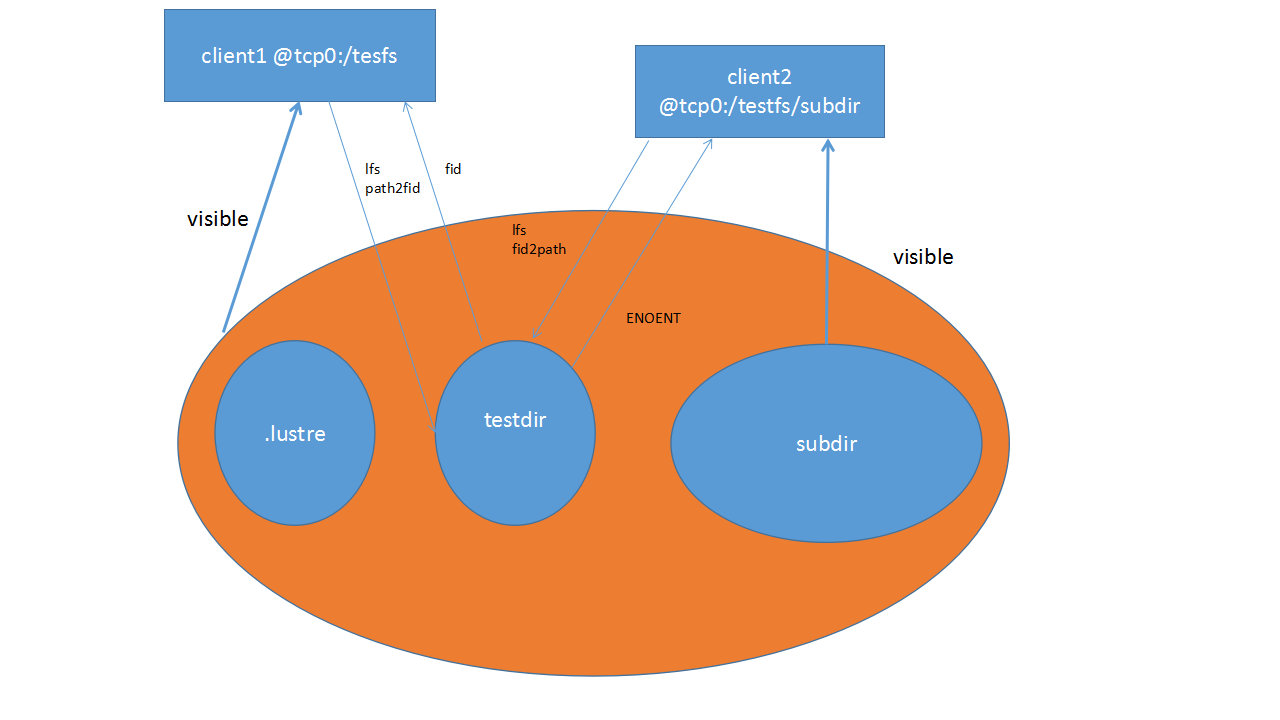
With the fileset feature, Lustre now provides subdirectory mount support. Subdirectory mounts, also referred to as filesets, allow a client to mount a child directory of a parent filesystem, thereby limiting the filesystem namespace visibility on a specific client. A common use case is for a client to use a subdirectory mount when there is a desire to limit the visibility of the entire filesystem namesapce to aid in the prevention of accidental file deletions outside of the subdirectory mount.
It is important to note that invocation of the subdirectory mount is voluntary by the client and not does prevent access to files that are visible in multiple subdirectory mounts via hard links. Furthermore, it does not prevent the client from subsequently mounting the whole file system without a subdirectory being specified.
Examples
The following example will mount the chipfs filesystem on client1 and create a subdirectory v1_1 within that filesystem. Client2 will then mount only the v1_1 subdirectory as a fileset, thereby limiting access to anything else in the chipfs filesystem from client2.
client1# mount -t lustre mgs@tcp:/chipfs /mnt/chip
client1# mkdir /mnt/chip/v1_1
client2# mount -t lustre mgs@tcp:/chipfs/v1_1 /mnt/chipv1_1You can check the created mounts in /etc/mtab. It should look like the following:
client1
mds@tcp0:/chipfs/ /mnt/chip lustre rw         0       0
client2
mds@tcp0:/chipfs/v1_1 /mnt/chipv1_1 lustre rw 0 0Create a directory under the /mnt/chip mount, and get its FID
client1# mkdir /mnt/chip/v1_2
client1# lfs path2fid /mnt/chip/v1_2
[0x200000400:0x2:0x0]
If you try resolve the FID of the /mnt/chip/v1_2 path (as created in the example above) on client2, an error will be returned as the FID can not be resolved on client2 since it is not part of the mounted fileset on that client. Recall that the fileset on client2 mounted the v1_1 subdirectory beneath the top level chipfs filesystem.
client2# lfs fid2path /mnt/chip/v1_2 [0x200000400:0x2:0x0]
fid2path: error on FID [0x200000400:0x2:0x0]: No such file or directory
Subdirectory mounts do not have the .lustre pseudo directory, which prevents clients from opening or accessing files only by FID.
client1# ls /mnt/chipfs/.lustre
        fid  lost+found
client2# ls /mnt/chipv1_1/.lustre
ls: cannot access /mnt/chipv1_1/.lustre: No such file or directory